Module 1
Getting to know your camera
Objective:Within the completion of Module 1, the students will demonstrate their ability to describe and label the functions of a digital camera, by completing a matching quiz on survey monkey with 85% accuracy, according to the answer key.
Activity:Students will be asked to look over a worksheet that labels all of the different buttons and functions on a typical DSLR camera. Then the students will watch videos 3-6 of the Basics of DSLR Camera videos, which are located on YouTube. These videos by Shraddha Kadakia will explain in depth the different functions of their camera. The students will follow along using their own camera, while watching the videos. They will take brief notes to help them remember the different functions when shooting outside, where the Internet isn’t present. The first video is listed below.
Assessment: The students will take a SurveyMonkey quiz on the different functions of their camera. The quiz will ask students about the different functions they will use in different setting to help them prepare for the next Module. To pass this module, the students will need to earn 85% out of 100% on the SurveyMonkey quiz. The will also need to email/dropbox their camera notes for a Pass/Fail grade.
Address Plagiarism and Diverse Learning Needs:The journal portion of this Module will not allow for students to plagiarize, they need to write both about the videos, as well as their own personal experiences when learning to use their camera. When the students take the SurveyMonkey quiz, they are allowed to use their notes. When addressing the ability to plagiarize someone else’s work, it wouldn’t be likely, since the questions ask more than just What the function does, but specifically what type of environment to use it. The assessment/assignment meets the needs of diverse learners, since they are able to reflect upon their own learning experience. This Module is also a self paced module, so they can either power through the Module, or take their time, depending on their learning preference.
Module 2
Shooting in RAW
Objective: Within the completion of Module 2, the student will demonstrate the proper use of the camera functions by creating a short Vimeo video explaining the 4 photographs they took, with at least 3 of them having correct explanations/composition according to the rubric
Activity : Students will use the information they learned from Module 1, as well as their notes for a refresher, and begin taking photographs. They will also view the rubric ahead of time, to know what the requirements are within the four different photographs. They will watch a short Lynda tutorial on how to create a vimeo account. They will use the video to display and explain their four photographs. The video is listed below.
Assessment :The students will be assessed on their ability use their knowledge of the camera settings to take proper photographs. They will also be assessed on their ability and effort to explain their four photographs and their motives within the composition. The students will also email/dropbox their 4 photographs, so I can check the RAW settings (when shooting in RAW camera setting, each photograph file imprinted with the exact date/time, iso, aperture, and shutter speed used for every photograph).
Address Plagiarism and Diverse Learning Needs: Plagiarism and diverse learning styles: This assignment would not be able to be plagiarized because of the camera RAW setting. Like I mentioned before, this setting tells you every detail about the photograph. It is impossible to use someone else’s photograph, unless they had the exact same camera, shot in camera RAW setting, and took the photograph on the exact same day. Diverse learning styles are met with this lesson, because each student gets to photograph their areas of interest and specialty. They are also able to express their ideas and motives while creating a Vimeo movie.
Module 3
Photoshop
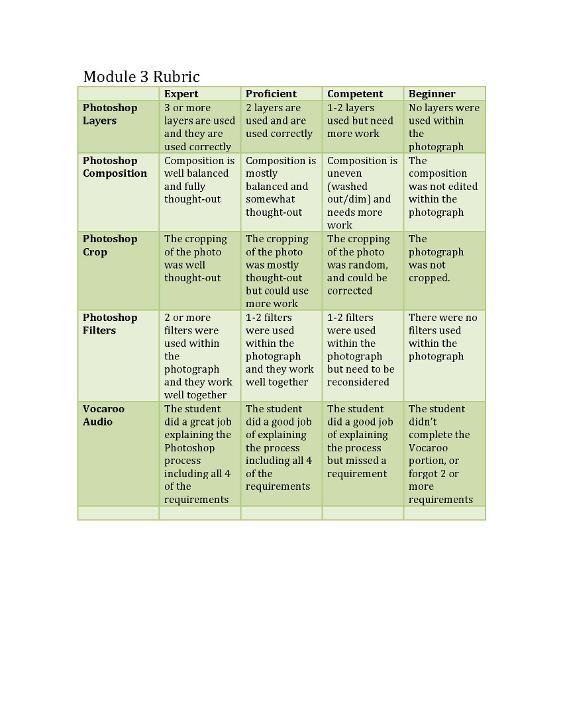
Objective: Within the completion of Module 3, the student will demonstrate their ability to use Photoshop by creating a Vocaroo audio, explaining the processes they used to edit their photograph, they will use all 4 of the tools listed on the rubric (Layers, Composition, Crop, Filters).
Activity: The students will watch a tutorial that I created on a few of the different tools in Photoshop. They will follow along with the tutorial, and practice on a photograph of choice. Then the students will use their acquired knowledge from Module 1 and 2 and take a photograph of their choice to demonstrate their knowledge of Photoshop. The students will use the rubric as a guideline, and create a Vocaroo audio explaining how they used the tools, as well as where. They will email/dropbox the original and edited photograph.
Assessment: The students need to correctly use all 4 of the tools listed on the rubric. They must also submit a Vocaroo video explaining how and why they used these tools. The students will be able to verbally explain their ideas and motives within this Module.
Address Plagiarism and Diverse Learning Needs: This assignment would also not be able to be plagiarized, because of the camera RAW setting. This setting imprints into the photographs file telling the viewer the specific date, time, iso, aperture, etc. The student also creates a Vocaroo video, which uses their voice and specifically talks about the rubric guidelines. When it comes to addressing diverse learning needs, the needs are met by the student’s ability to choose their interest area for photographing. They also use Vocaroo to explain verbally their different techniques and reasoning for how they edited their photograph.
Module 4
Elements of Art- (shape, color, form, value, texture, line)
Objective: Within the completion of Module 4, the students will demonstrate their knowledge of The Elements of Art, by photographing all 6 of the Elements of Art, and displaying all 6 of them in their online portfolio
Activity: The students will be reintroduced to the elements of art, and will then be assigned to photograph all 6 of them. They will use their knowledge of Photoshop to edit the photographs, and then they will compile them as well as the other photographs of the course into an online portfolio. They will briefly journal about each photograph, and submit both through email/dropbox.
Assessment: The students are required to turn in 6 photographs, using the 6 elements of art as the subject matter. They will do brief journal about their concepts within each photograph, and the portfolio will be graded on a complete/incomplete guideline.
Address Plagiarism and Diverse Learning Needs:This assignment would also not be able to be plagiarized, because of the camera RAW setting. This setting imprints into the photographs file telling the viewer the specific date, time, iso, aperture, etc. The needs of diverse learners will be met through the openness of the assignment. The students are able to photograph anything that interests them, and they will be able to use their notes and video resources to complete the Photoshop portion. They will journal to help me understand their concepts within their photograph.
Assessment Tools
SurveyMonkey: SurveyMonkey is a great resource to use to check understanding, because not only does it let the students test in a different format then written test, it also compiles the results so as a teacher I can see where the class struggled, and adapt my teaching to better suit my students. Another advantage of using this tool is that the students can use it anywhere; there is even a phone app for SurveyMonkey, making it very adaptable for online learning. A disadvantage of using SurveyMonkey, is that since it is an online survey, the students will have access to the internet, and are able to look up the answers to the quiz. Although I like to think the students would use their own knowledge to answer the questions, I would be naïve to think that. That being said, when the students move on to Module 2, it will become relevant if they learned the proper functions of the camera or not.
Rubrics: I chose to use a rubric for 2 of the module assessments, because they work as a guide for the students. They are able to read from the rubric and know what type of grade they have earned. They can also use the rubrics as a form of checklist. They can go down the line and make sure they have met all the requirements, such as in Module 3 when they are using Photoshop, they can look at their rubric and photo to see if they cropped, layered, changed the composition, etc. One disadvantage I find when using rubrics is some students are turned off to them. They find them to be lengthy, full of words, and boring. That being said, I do my best to spruce up my rubrics, and use key words so they aren’t overwhelming and lengthy for the students to look at.
Portfolio: The third type of assessment I used is a compiled portfolio. When using this as an assessment tool, I look through the portfolio and check to make sure there are 6 photographs, each displaying a different element of art. A disadvantage of using this technique is sometimes there can be technical difficulties uploading photographs to a web base when there are taken in camera RAW. This is because the file sizes are so large. If the students closely follow the directions they are able to downsize the files and correctly upload them. A definite advantage in using a portfolio for assessment is that the students have a nice showcase of their work at the end of the module.
Vimeo and Vocaroo: These two online tools allow students to incorporate their voice into a slideshow of images, or simply over one image. These tools are beneficial assessment tools, because they allow the students to verbalize their ideas, easier then writing them out. These assessment tools are also beneficial because they can circle, type, or hand write within the video. This helps the students to showcase specific parts of a photograph when showing changes. A disadvantage of both these tools is that they have to be learned. Students can become overwhelmed when asked to learn a new type of program for every assignment. Another disadvantage is that with slower internet speeds they can take quite a bit of time to upload photographs.
